The common site-to-site VPN assumption is simple: both sides should have a fixed public address.
That assumption works well in a data centre, a cloud VPC, or a branch with business-grade connectivity. It gets weaker when the on-prem side is a small office, campus, training environment, regional site, or platform node behind an ISP that can change the public address. The usual workaround is dynamic DNS. It is familiar, but it can become too central to the design: the DNS update client, record propagation, resolver caching, and every cloud-side peer now sit in the recovery path when the address changes.
For the HybridOps WAN reference surface, the design went a different way.
The stable public edge sits on Hetzner. The on-prem site extends into it. GCP (Google Cloud Platform) exchanges routes with it. VyOS is the routed edge on the Hetzner side and the on-prem side, so the routing model, IPsec model, and operational commands stay consistent.
The pattern
The key decision is to move the stable public anchor away from the dynamic site.
In this model, the Hetzner VyOS pair has stable public reachability. The on-prem VyOS edge extends into that pair through the site-extension layer instead of asking GCP, DR, and burst services to peer directly with a changing on-prem address.
on-prem Proxmox
  VyOS edge VM
    outbound IPsec + BGP
      -> Hetzner VyOS edge-a
      -> Hetzner VyOS edge-b
        HA VPN + BGP
          -> GCP Cloud Router
The on-prem peer still needs a stable identity or endpoint. In the current module, onprem_peer_remote_address can be a fixed IPv4 address or a hostname/FQDN. The difference is that this detail is contained at the site-extension layer. GCP and the rest of the platform route through the stable Hetzner edge instead of depending on the on-prem site directly.
That turns the dynamic public IP into a site-extension concern, not the foundation for every cloud-facing path.
Why VyOS on both sides
The useful part is not just that VyOS can run the tunnel. Many platforms can do that. The useful part is that VyOS gives both sides of the routed edge the same operational shape.
The Hetzner edge nodes run VyOS. The on-prem edge VM runs VyOS. The day-2 policy uses the same ideas on both sides:
- route-based IPsec
- BGP peering
- explicit import and export policies
- predictable CLI inspection
- the same routing vocabulary for the cloud-facing and site-facing layers
That matters during troubleshooting. A tunnel problem does not require switching between unrelated router interfaces or mental models. The operator can check the same BGP and IPsec surfaces on each edge.
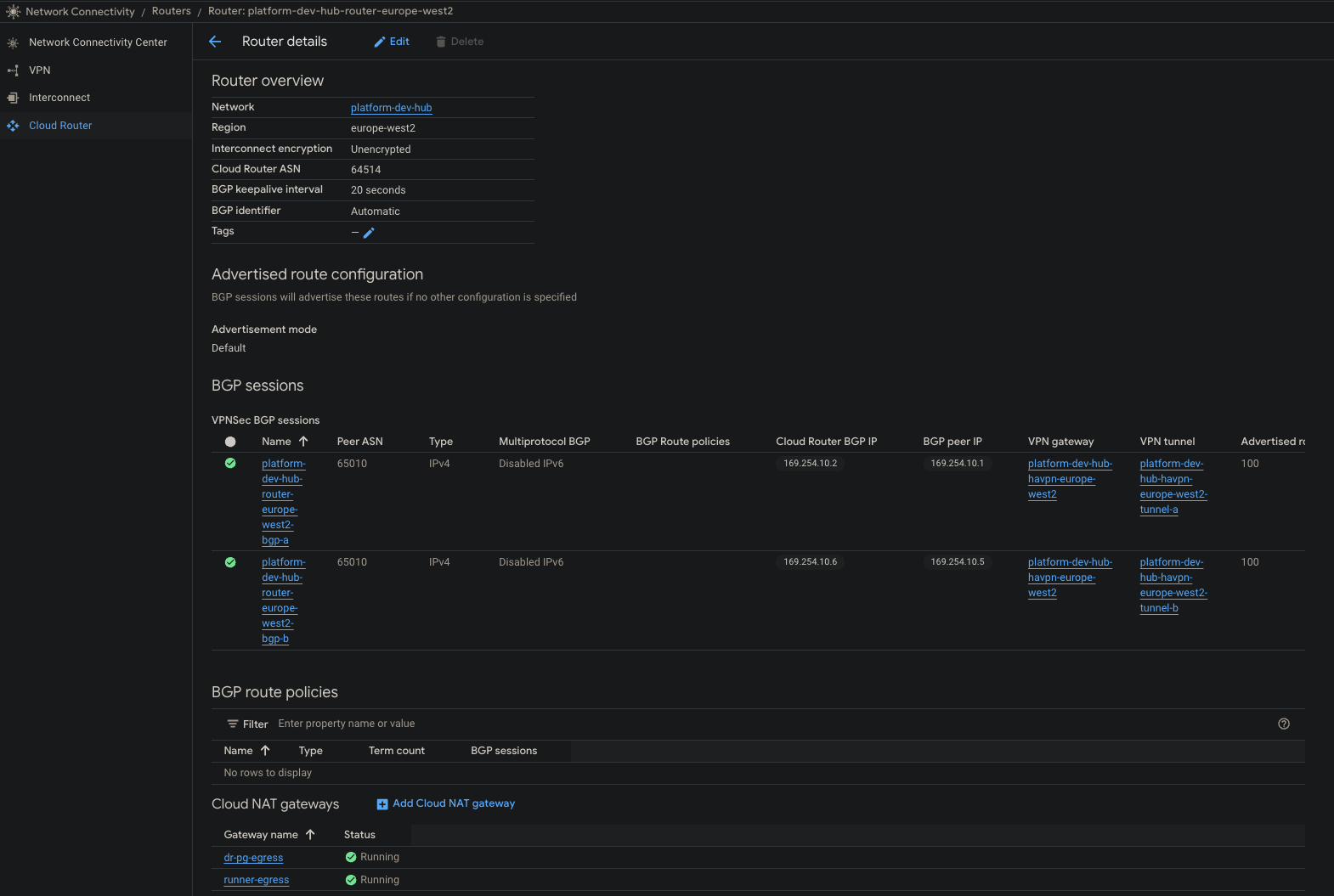
The verified run below shows the cloud side learning routes from the VyOS edge pair through Cloud Router.
The static hub
The Hetzner side is intentionally simple. It provides the static public face of the WAN fabric, a private network for edge and control-plane coordination, and two VyOS edge nodes.
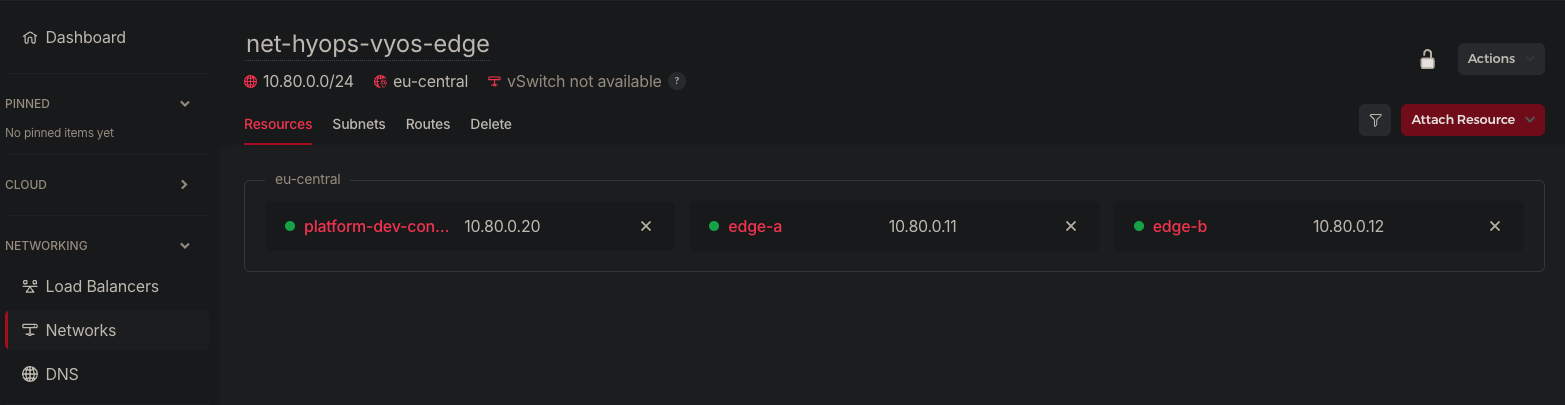
In the HybridOps implementation, that edge is built from a state-published VyOS image rather than a one-off server. The module path is:
core/shared/vyos-image-build
  -> core/hetzner/vyos-image-seed
  -> org/hetzner/vyos-edge-foundation
  -> platform/network/vyos-edge-wan
The image build step publishes one canonical VyOS artifact. The Hetzner seed step registers or uploads that artifact. The edge foundation step creates the routed edge pair. The day-2 WAN module applies the IPsec and BGP policy.
The important boundary is that image preparation, edge provisioning, and routing policy are separate. Replacing an edge node should not require rediscovering how the WAN policy is meant to work.
The on-prem side
On-prem, VyOS runs as a Proxmox VM. That VM sits between the internal platform network and the upstream WAN. It initiates the site extension to Hetzner and advertises only the approved internal prefixes.
The on-prem edge path is also state-first:
core/shared/vyos-image-build
  -> core/onprem/vyos-template-seed
  -> platform/onprem/vyos-edge
  -> platform/network/vyos-site-extension-onprem
The same VyOS image artifact can feed both the Hetzner edge and the Proxmox template path. On Proxmox, the template seed step can smoke-check the template by booting a transient clone and verifying that the expected VyOS cloud-init marker landed in config.boot.
That check is small, but it catches a painful class of failures: images that look like valid VM templates but do not actually accept the intended first-boot configuration.
The first-boot intent for the on-prem VyOS edge is explicit:
cloud_init_user_data: |
  #cloud-config
  hostname: edge-01
  manage_etc_hosts: true
  vyos_config_commands:
    - set system host-name 'edge-01'
    - delete interfaces ethernet eth0 address dhcp
    - set interfaces ethernet eth0 address '10.10.0.20/24'
    - set interfaces ethernet eth0 description 'Management'
    - set interfaces ethernet eth1 address 'dhcp'
    - set service ssh port '22'
That keeps the edge VM rebuildable. The VM is not just a router someone clicked into shape. It is a routed edge appliance with declared boot intent.
BGP as the failover layer
The edge pair does not need to share a virtual IP for tunnel traffic. Each edge has its own tunnel and BGP session. When one path fails, routes learned through that path withdraw and the other path remains available.
The recorded VyOS state showed two BGP peers established from the edge:
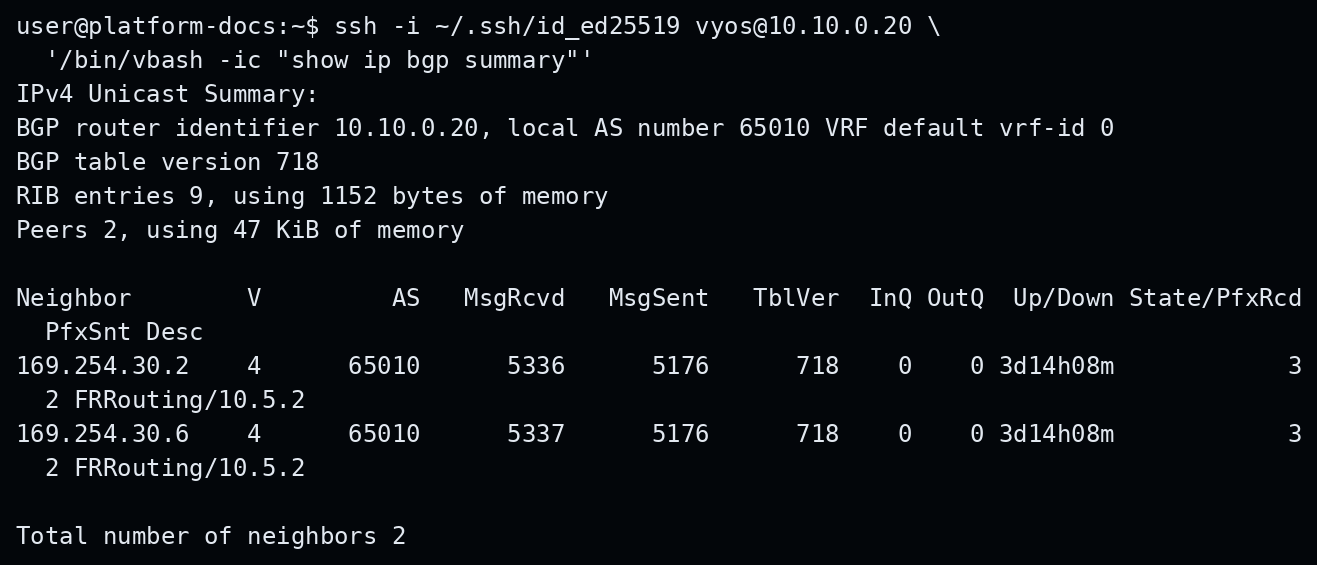
A simplified inspection command is ordinary VyOS:
show ip bgp summaryRepresentative output from the recorded surface:
IPv4 Unicast Summary:
BGP router identifier 10.10.0.20, local AS number 65010

Neighbor        V   AS     State/PfxRcd
169.254.30.2    4   65010  3
169.254.30.6    4   65010  3
The exact addresses are environment-specific. The useful point is the operational shape: tunnel health and route health are visible at the edge, and the route table becomes the thing that tells downstream systems what is reachable.
What the implementation checks
There are a few checks that turned out to matter more than the high-level diagram.
First, the firewall allowlist matters. The Hetzner edge has to allow the current IPsec peers. If the GCP HA VPN public addresses change and the Hetzner firewall policy is stale, the day-2 VyOS module should fail before trying to change router policy. When the on-prem peer is a fixed IPv4 address, that source also has to be admitted. That is better than producing config churn when the real problem is packet admission.
Second, routes should not be advertised before they exist. The default WAN policy keeps advertised prefixes empty for the first cloud-to-edge underlay. Spoke, on-prem, or workload prefixes are added only when those routes are actually present on the edge.
Third, cloud prefixes should be consumed from state where possible. In the HybridOps path, the VyOS day-2 module can read GCP hub network outputs, including ranges such as GKE pod CIDRs, and include them in route policy when those paths are meant to be reachable.
That prevents the route model from becoming a pile of copied CIDRs.
The useful code boundary
The high-level blueprint is deliberately readable:
steps:
  - id: vyos_artifact_build
    module_ref: core/shared/vyos-image-build

  - id: vyos_image
    module_ref: core/hetzner/vyos-image-seed

  - id: hetzner_edge_foundation
    module_ref: org/hetzner/vyos-edge-foundation

  - id: gcp_wan_vpn_to_edge
    module_ref: org/gcp/wan-vpn-to-edge

  - id: vyos_edge_day2
    module_ref: platform/network/vyos-edge-wan
The on-prem site extension is a separate blueprint:
steps:
  - id: site_extension_edge
    module_ref: platform/network/vyos-site-extension-edge

  - id: site_extension_onprem
    module_ref: platform/network/vyos-site-extension-onprem
That split keeps the WAN fabric understandable. The Hetzner-to-GCP hub can exist before the on-prem site is attached. The site extension can be changed without pretending it is the same lifecycle as the cloud hub.
What this gives operators
This design gives operators three practical benefits.
The first is a stable public anchor. The environment no longer asks every cloud-side path to depend directly on the on-prem site’s public address.
The second is consistent edge operations. VyOS gives the on-prem and Hetzner sides the same routing and inspection model.
The third is repeatability. The image, edge nodes, tunnel policy, BGP policy, and route checks are all part of the same delivery path. The platform can produce run records that show what was built and what was verified.
That does not remove the need for network understanding. It makes the network understanding repeatable.
Why this matters to the VyOS community
VyOS is often discussed as a router or firewall distribution. That is accurate, but it undersells the role it can play in hybrid infrastructure.
In this pattern, VyOS is the common routed edge across on-prem and public infrastructure. It sits between Proxmox, Hetzner, and GCP without becoming tied to any one of them. It gives the operator a consistent routing surface while the surrounding infrastructure changes.
That is a strong fit for teams that need a practical hybrid WAN but do not want a large hardware edge footprint, a proprietary virtual router dependency, or a cloud WAN design that couples every service to a changing site address.
The interesting lesson is not “use this exact topology.” The lesson is that the static edge does not have to live at the on-prem site. Once the stable public edge moves to a place with stable public addressing, the dynamic site becomes easier to contain and reason about.